Complete guide
How to Brand Shipping Labels: 4 Ways That Work
Learn how to brand shipping labels with your logo: shipping software, pre-printed stock, DIY design or a 4x8 branding tool. Costs, limits and steps compared.
11 min readOct 30, 2026Read
Put your logo on every shipping label your Rollo printer prints: use 4x8 labels, upload your 4x6 label PDF, and print. Start with 10 free labels a month.
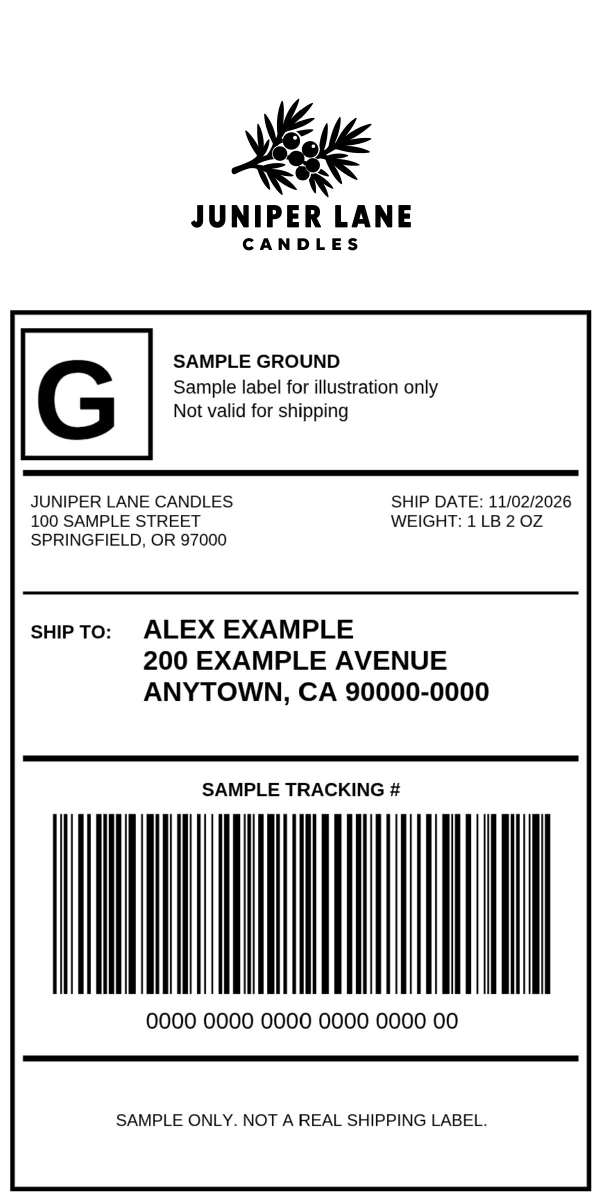
Your Rollo printer turns out a clean shipping label for every order, but it's the plain label your carrier sold you, and it's the first thing your customer sees. You can change that without changing printers or shipping software: print on a 4x8 label, with your logo in a 2-inch strip above the standard 4x6 shipping label.
This guide shows how to make that branded label from the 4x6 label PDF you already download, how to set your printer up for 4x8 labels, and what to watch for so every label prints and scans cleanly.
A 4x6 shipping label leaves almost no free space, and you must never cover or change the carrier's part of it: the barcodes, tracking number, addresses and postage. That leaves two practical ways to add a logo.
Turn on branding in your shipping software, if it has it. ShipStation, for example, lets you add your logo to the label itself. The logo prints in black and white, it has to fit the small space the label leaves, and since it's a ShipStation setting, it only brands the labels you create in ShipStation.
Print on a 4x8 label. A 4x8 label gives you the full 4x6 shipping label plus a 2-inch strip above it for a larger, clearer logo. Brand My Label builds that 4x8 label for you:
It's free for 10 labels a month, with no credit card. Brand your first label free.
Our guide to how to brand shipping labels compares every method, including pre-printed stock.
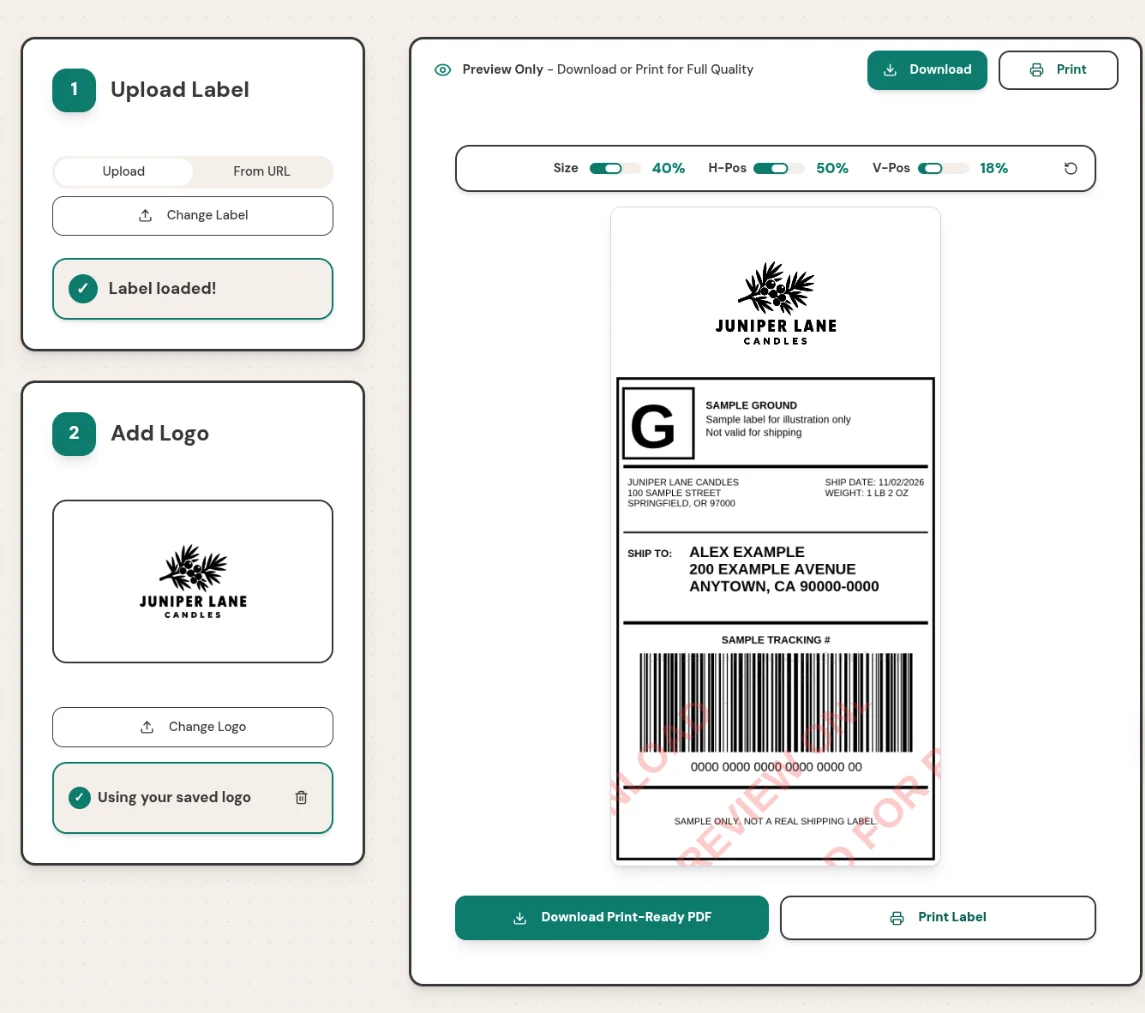
The free plan covers 10 labels a month. For more, Pro is $5 a month, or $50 a year, for unlimited labels; you can cancel any time (Pro stays on until the end of the period you paid for), and a first Pro purchase can be refunded within 14 days. Compare the plans.
Rollo's printers take direct thermal labels from 1.57 to 4.1 inches wide, so a 4-inch-wide 4x8 label fits. Rollo doesn't sell 4x8 labels, but other label makers sell 4x8 direct thermal labels, and Rollo's supplies guide says "You can use any compatible direct thermal labels with your Rollo printer." Avoid thermal transfer labels, which need a ribbon these printers don't use.
Then tell the printer and your computer about the new size. Install Rollo's printer driver (Mac or Windows) first if you haven't: the USB printer needs it, and the Wireless printer needs it to print sizes other than 4x6 over a USB cable. Rollo's guide to custom label sizes gives the steps for each model.
On the Rollo USB Label Printer (X1038):
On the Rollo Wireless Label Printer (X1040): on the same Wi-Fi network as the printer, open the Rollo App and go to Menu, Rollo Printer, Default Rollo Printer, Settings. In the Rollo Printer Portal, click "Media", create a new custom size, and click "Save Changes". You may need to reopen the app you print from before the new size appears.
Rollo's Wireless printer unboxing guide lists a paper height of up to 12 inches, which covers an 8-inch label. The USB printer's product page doesn't give a maximum length. Either way, print one test label before you buy a large supply, and check that the whole label prints on a single label without feeding a blank one.
Once your printer is set up, every label after that is the same few steps. Try Brand My Label free.
For product labels, stickers and barcode labels you design from scratch, Rollo's free Label Designer is a good fit. It's less suited to a shipping label you've already bought: its upload takes images, not PDFs ("Wrong image file format"), so each label has to be converted to an image first and then dragged into place by hand, with no size or position fields. Brand My Label takes your 4x6 label PDF as it is and places it for you.
No. They're direct thermal, so they print in black. For a full-color logo, order label stock with your logo printed in advance and print your shipping information on it.
They take labels up to 4.1 inches wide, and Rollo's custom-size steps let you define a 4x8 size. Rollo lists a paper height of up to 12 inches for the Wireless printer, and the USB printer's product page doesn't list one. Buy 4x8 direct thermal labels and print a test label first.
No. Keep buying labels where you do now. Brand My Label works from the 4x6 label PDF or image your carrier or shipping software gives you.
Any direct thermal label from 1.57 to 4.1 inches wide, from Rollo or another maker. For branded shipping labels made with Brand My Label, use 4x8 labels; for plain shipping labels, or labels branded inside your shipping software, 4x6.
Yes, for 10 labels a month, with no credit card. Pro is $5 a month or $50 a year for unlimited labels.
Your printer already prints the shipping label; Brand My Label adds your logo. Set up 4x8 labels once, then brand each label from the 4x6 PDF your carrier gives you.
Shipping from Shopify? See how to brand Shopify shipping labels. Questions? Email support@brandmylabel.app.
To put your logo on every shipping label your Rollo printer prints, try Brand My Label free: 10 labels a month, no credit card.
Learn how to brand shipping labels with your logo: shipping software, pre-printed stock, DIY design or a 4x8 branding tool. Costs, limits and steps compared.
Shopify shipping labels can't carry your logo on their own. See what Shopify and shipping apps offer, and how to add your logo to the labels you already buy.