You put care into the box, the tissue paper and the thank-you card. Then a plain carrier label goes on the outside, and that's the first thing your customer sees. If you want to know how to brand shipping labels, the good news is that you have several options, from a setting in your shipping software to a tool that adds your logo to the label you already have.
There are four practical ways to do it: inside your shipping software, with pre-printed label stock, by hand in a design tool, or with a branding tool that adds your logo to the label you already have. This guide compares their cost, effort and limits so you can pick the one that fits how you ship.
What makes a branded shipping label work
A branded shipping label is a normal carrier label with your logo or brand mark added. The carrier's part of the label has to stay exactly as it was printed: the barcodes, the tracking number, the addresses and the postage information. Sorting machines and drivers scan those, so you never resize, recolor or cover them.
Your branding goes in space the carrier doesn't use. That's a reserved area your shipping software provides, space on label stock printed with your logo, or extra room on a larger label. The rule for every method: add to the label, never change what the carrier printed.
Two things shape every method. First, your printer decides the color, not your logo file. Many small shops print on a direct thermal printer, such as one from Rollo or Zebra, which prints in black, so plan on a black and white logo. Color label printers, such as Epson's ColorWorks inkjet line, print logos in full color. Second, a 4x6 label has very little free space. That's why some methods use a 4x8 label: the extra 2 inches give your logo room and leave the carrier label untouched.
Way 1: How to brand shipping labels in your shipping software
Some shipping platforms let you add a logo directly to the labels you buy through them.
ShipStation lets you add your logo and short label messages to the shipping label itself. Its own guide notes that the logo prints in black and white and that label messages have a character limit, because labels are small. See ShipStation's branded shipping labels guide.
ShipEngine (now being renamed ShipStation API) supports a logo image on labels for many USPS, UPS, FedEx and DHL services. Its documentation lists the limits: PNG or JPG only, up to 512KB, a solid background, and no branding on labels requested in ZPL format. See ShipEngine's label branding documentation.
- Cost: included in the software, if your plan and carrier support it.
- Effort: a one-time setup.
- Limits: only for labels bought through that platform, and only for the carriers and formats it supports. The logo has to fit the space the label reserves.
Best for: sellers who already buy every label through a platform that offers branding. Check your own shipping software's settings or help pages before assuming it does.
Way 2: Order pre-printed custom label stock
Label printing companies offer custom stock with your logo printed on it. Make sure you order stock made for your printer type (thermal or inkjet and laser) and with room for the logo, because a standard 4x6 shipping label fills the whole 4x6 face. You load the stock into your printer and print your shipping labels on it, so check that each label prints clear of the logo.
- Cost: custom stock costs much more per label than plain labels, and orders usually come with minimums. Brand My Label's savings calculator uses $0.40 per pre-printed label with a 500-label minimum as its comparison point. Check current prices with the vendor you choose.
- Effort: design once, reorder when you run low.
- Limits: you pay for stock up front, you hold inventory, and changing your logo means ordering a new batch.
Best for: high-volume shops with a stable design that use the same label size for every order.
You can download your label as a PDF, open it in Canva, Adobe Illustrator or GIMP, place your logo, and export it again for printing.
- Cost: free to the price of a design tool subscription.
- Effort: several minutes for every single label, because each label has a new address and barcode.
- Limits: it's easy to resize or blur the carrier's part of the label by accident, and the export has to stay sharp enough to scan. That makes it risky as well as slow.
Best for: a few labels a month, or a one-off special shipment.
Way 4: How to brand shipping labels with Brand My Label
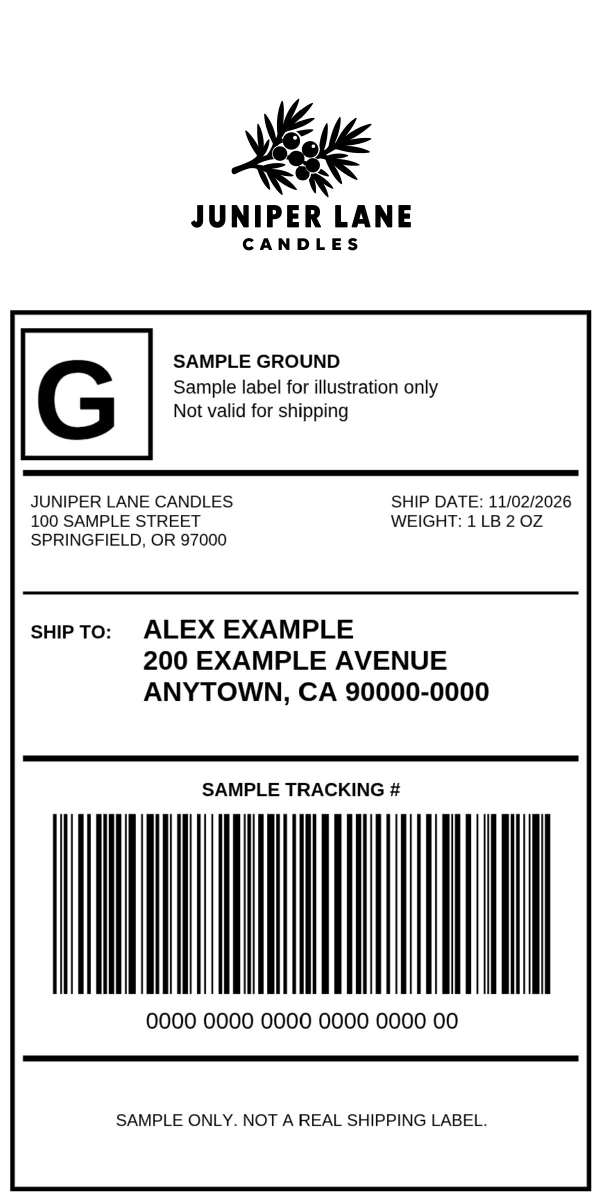
Brand My Label takes the 4x6 label you already have and turns it into a 4x8 branded label. Your 4x6 label fills the bottom 6 inches, and your logo goes in the 2-inch strip above it. A large or tall logo can spill onto the label, so keep it inside that strip. It works with any 4x6 label you can download, from any carrier or shipping software, so you don't have to change how you ship.
Here's the whole process:
- Sign in. Open the label editor and sign in. You need a free account to use it.
- Add your label. Click "Upload Label (PDF or Image)" and choose your label as a PDF, PNG or JPG, or drag it in. If your label lives at a Shippo, USPS, UPS, FedEx or Stamps.com link, paste it on the "From URL" tab and click "Load from URL". For a PDF, the first page is used.
- Add your logo. Click "Upload Your Logo" and pick a PNG, JPG or SVG file.
- Place it. Use the Size, H-Pos (horizontal position) and V-Pos (vertical position) sliders until the logo sits inside the top strip, clear of the label, and check the preview. A square or tall logo usually needs a smaller Size to fit. Click "Save Logo for Next Time" so it's ready the next time you use this browser.
- Download or print. Click "Download" for a 4x8 PDF at 300 DPI, or "Print" to open it in your browser's print dialog.
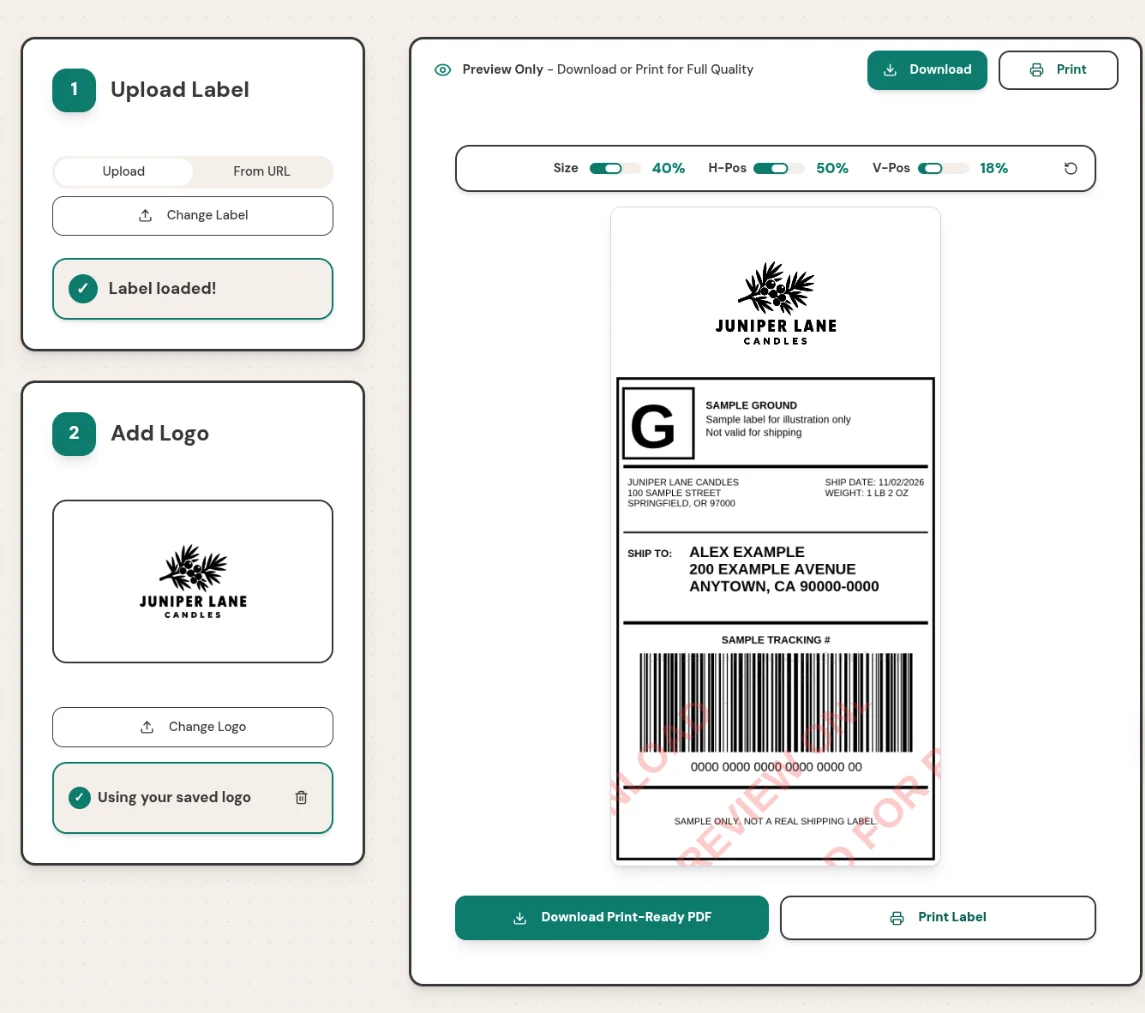
Labels you upload are processed in your browser and never leave your computer. A label loaded from a link is fetched through Brand My Label's server first. The on-screen preview shows a watermark, but the PDF you download doesn't have one.
- Cost: the free plan covers 10 labels a month. Pro is $5 a month or $50 a year for unlimited labels. There's no credit card needed for the free plan, and you can cancel Pro any time. See the plans.
- Effort: upload the label, place your logo, download. A saved logo is ready the next time.
- What you need: 4x8 labels for the 4-inch thermal printer you already use. Many 4-inch printers take longer labels; Zebra's ZD400 series specifications list labels up to 39 inches long. If your printer's specs don't give a maximum length, print one test label first.
Best for: small shops that want a large, clear logo on every package without minimum orders or a change of shipping software.
Which way to brand shipping labels fits your shop
| Method |
Upfront cost |
Time per label |
Main limit |
| Shipping software branding |
Included, if supported |
None after setup |
Only that platform's labels and carriers |
| Pre-printed label stock |
Stock and minimum order |
None |
Inventory; reprint to change the design |
| Design tool |
Free to a subscription |
Several minutes |
Slow, and easy to damage the label |
| Brand My Label |
Free for 10 a month, then $5/month |
Upload, place logo, download |
Needs 4x8 label stock |
If your shipping software already supports branding and covers your carriers, start there. If you ship a large, steady volume with one design, pre-printed stock is worth pricing. If you want a bigger logo, buy labels from several sources, or don't want minimum orders, a branding tool fits.
What branded labels cost at 100 orders a month
Prices change, so treat this as a way to run your own numbers rather than a quote. Take a shop that ships 100 orders a month.
Shipping software branding adds nothing beyond the plan you already pay for, if your platform and carriers support it. Check before you count on it.
Pre-printed stock, at the $0.40 per label and 500-label minimum that Brand My Label's savings calculator uses, means paying $200 up front for five months of labels. That works out to $40 a month, and you reorder every five months, sooner if a design change leaves stock unused.
A design tool costs time instead of money. If each label takes five minutes to edit and check, 100 labels take more than eight hours a month.
Brand My Label costs $5 a month on Pro for unlimited labels, or $50 a year, which comes to about $4.17 a month. A shop that ships 10 orders or fewer a month pays nothing on the free plan. In every case you also need plain 4x8 label stock, so compare its price with the 4x6 labels you buy today.
Tips for labels that print and scan cleanly
- Use a high-resolution logo. A vector SVG or a large PNG prints sharper than a small image scaled up.
- Design for your printer. A direct thermal printer prints your logo in black, so use a high-contrast version.
- Leave the carrier's area alone. Never let your logo overlap a barcode, the tracking number or an address.
- Match your label stock to your file. A 4x8 PDF needs 4x8 labels loaded in the printer.
- Print one test label first. Check that the barcode is crisp and the logo sits where you expect, then print the rest.
Frequently asked questions
How do I add a logo to a shipping label?
You can turn on label branding in shipping software that supports it, order label stock with your logo pre-printed, place your logo by hand in a design tool, or use a tool like Brand My Label to add it to a label you've already bought. The right choice depends on your volume and where you buy labels.
How can I customize shipping labels?
Keep the carrier's information exactly as printed and add your branding in unused space. Shipping software may offer a logo area and short messages; a 4x8 label gives you a 2-inch strip above the standard 4x6 label for a larger logo.
Will carriers accept branded labels?
What carriers care about is that the barcodes, tracking number, addresses and postage information stay unaltered and readable; USPS publishes its package barcode requirements in Publication 199, its Intelligent Mail package barcode guide. Never place anything over the carrier's part of the label.
How do I make my own shipping labels?
You buy postage and print the label through a carrier website or shipping software, usually as a 4x6 label on a thermal printer. To brand it, use one of the four methods in this guide.
Can I hand write my own shipping label?
You can handwrite addresses on a package you take to a counter to pay for postage. Labels you buy online include barcodes that must be printed, so they can't be written by hand.
Can my logo be in color?
Yes. Your logo stays in color in the PDF; whether it prints in color depends on your printer. A direct thermal printer, the usual kind for shipping labels, prints it in black, so choose a version of your logo with good contrast. A color label printer can print it in color.
Start branding your shipping labels
Now you know how to brand shipping labels four ways: inside your shipping software, with pre-printed stock, by hand, or with a branding tool. Pick by where you buy labels, how many you ship and how big you want your logo.
Shipping from Shopify? Read how to brand Shopify shipping labels. Printing on a Rollo printer? See how to print branded shipping labels on a Rollo printer. Questions? Email support@brandmylabel.app.
If you want a clear logo on every label without changing how you ship, try Brand My Label free: 10 labels a month, no credit card. It's a free way to see how to brand shipping labels with your own logo.